
Getting Started
- New Game Settings
- Continue Game
- Join Game
- Settings
- Controls
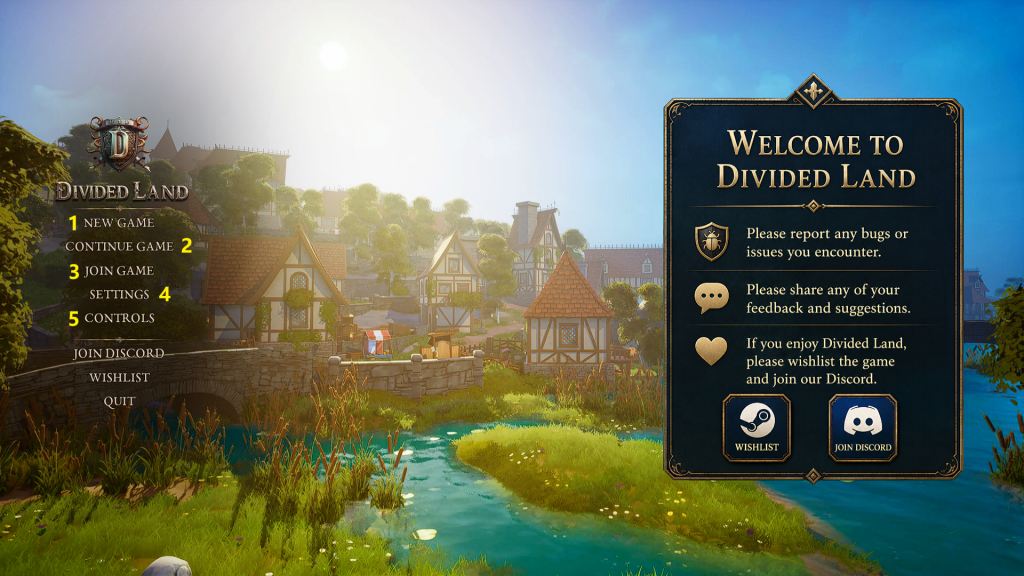
(1) new game
settings can be changed bla hblah
General
- Server Name– Enter the name for the Gameworld/Server.
- Multiplayer (On/Off) Select “Off” for Single Player.
- Max Players (4/6/8) Goes blank when MP set to Off, Set for Max amount players allowed.
- PvP (On/Off) enables raiding and killing of other non Tribe players.
- Tribe Friendly Fire (On/Off) Set to Off to prevent damage to each other in a Tribe.
- Easy Anti-Cheat (On/Off) Enables Anti Cheat software.
- Server Password– Enter password, clicking on the “eye” symbol will reveal it (to check correct spelling).
Advanced Settings
- Full Loot (Death)– (On/Off) Off = Only inventory items drop not Hotbar or worn items. On= everything drops
- Full Day Cycle Length (Hours)– (1/2/4/6/8/12/24) The amount of real time hours before the Horde Night happens.
- Character XP Rate– (10%-300%) Default is 100%.
- Admin Mode– (On/Off) The F1 Admin Menu can spawn things in and alter skills etc, more information is here.
- Breeding Speed Rate– (50%-1200%) Default is 300%. Controls Animal Progression (mating time, pregnancy time, egg laying time, baby growth rate, leveling speed and produce collection timers from Tamed Animals (Milk/Wool etc).
- Loot Rate– (50%-1200%) Default is 300% Increases the percentage chance of getting higher tier loot drops but not more of the same item, just more loot as more things have a better chance to be spawned.
- Horde Size Multiplier– (0%-400%) Default is 100% and setting it to 0% means no one turns up!