World Settings
The available World Settings are Easy, Standard, Brutal, and Hardcore. These settings are chosen before the world is created but can also be edited in game in the Esc Menu under “Edit World”.
Difficulty Items Drop on Death Enemy Damage Hunger Rate Permadeath Easy No 0.75x 0.75x No Standard Yes 1.0x 1.0x No Brutal Yes 1.5x 1.5x No Hardcore Yes 1.5x 1.75x Yes
Game Settings
Language English, Spanish, Russian, Chinese Mouse Sensitivity 1 – 20 (7-10 is standard) Invert Y-Axis On or Off (Off is default) Camera Positioning To The Right or Above (Above is default)
Key bindings
Move Forward W Move Backward S Move Left A Move Right D Auto Run Equals (=) Jump Space Bar Sprint Left Shift Roll Left Ctrl Interact F Toggle Mount Slot Q Toggle Weapon Slot E Attack LMB Aim RMB Hover Loot H Use or Eat Item RMB Split Stack Left Shift + LMB Quick Transfer Left Ctrl + LMB Toggle Inventory Tab Toggle Crafting K Toggle Building B Toggle Professions P Toggle Quests L Toggle Map M Toggle Collections J Emote Wheel T Show Cursor Left Alt Hotbar 1 1 Hotbar 2 2 Hotbar 3 3 Hotbar 4 4 Hotbar 5 5 Spell 1 Z Spell 2 X Spell 3 C Spell 4 V
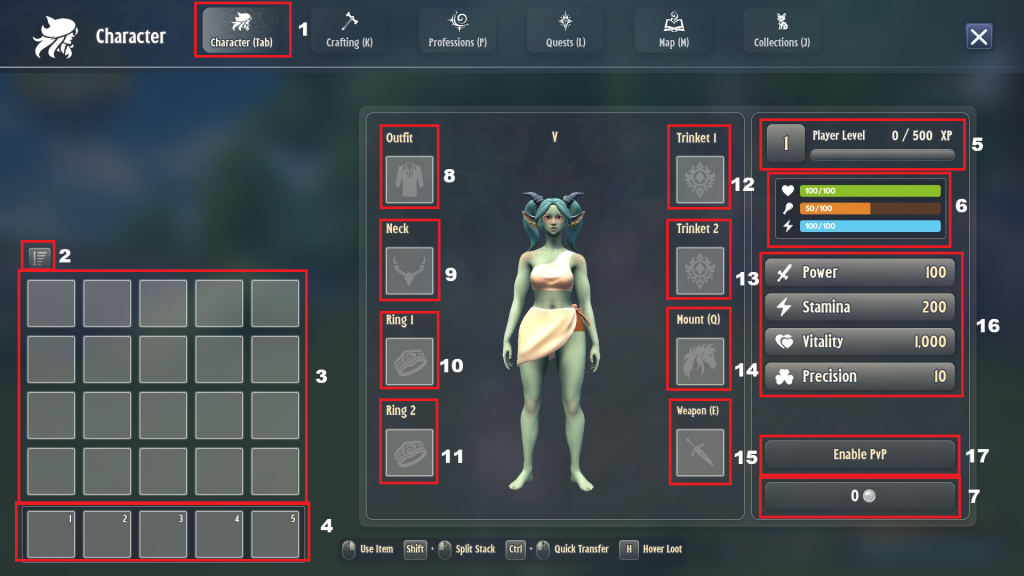
Character HUD
Character Tab button
Sort Inventory
Inventory Slots
Hotbar
Play Level and XP bar
Health, Food, and Stamina HUD
Gold and Silver Coin display
Outfit Slot (Armor)
Neck Slot (Nacklace)
Ring 1 Slot
Ring 2 Slot
Trinket 1 Slot
Trinket 2 Slot
Mount Slot
Weapon Slot
Power, Stamina, Vitality, and Precision stats
Enable PvP